Announcement
Your content, your model, your keys
Shapio 0.8.0 adds Write, Suggest, and Fill in… to assist. All of it runs on a model provider you configure with your own key, or on a model on your own hardware, with a record of every run and nothing published by a model.
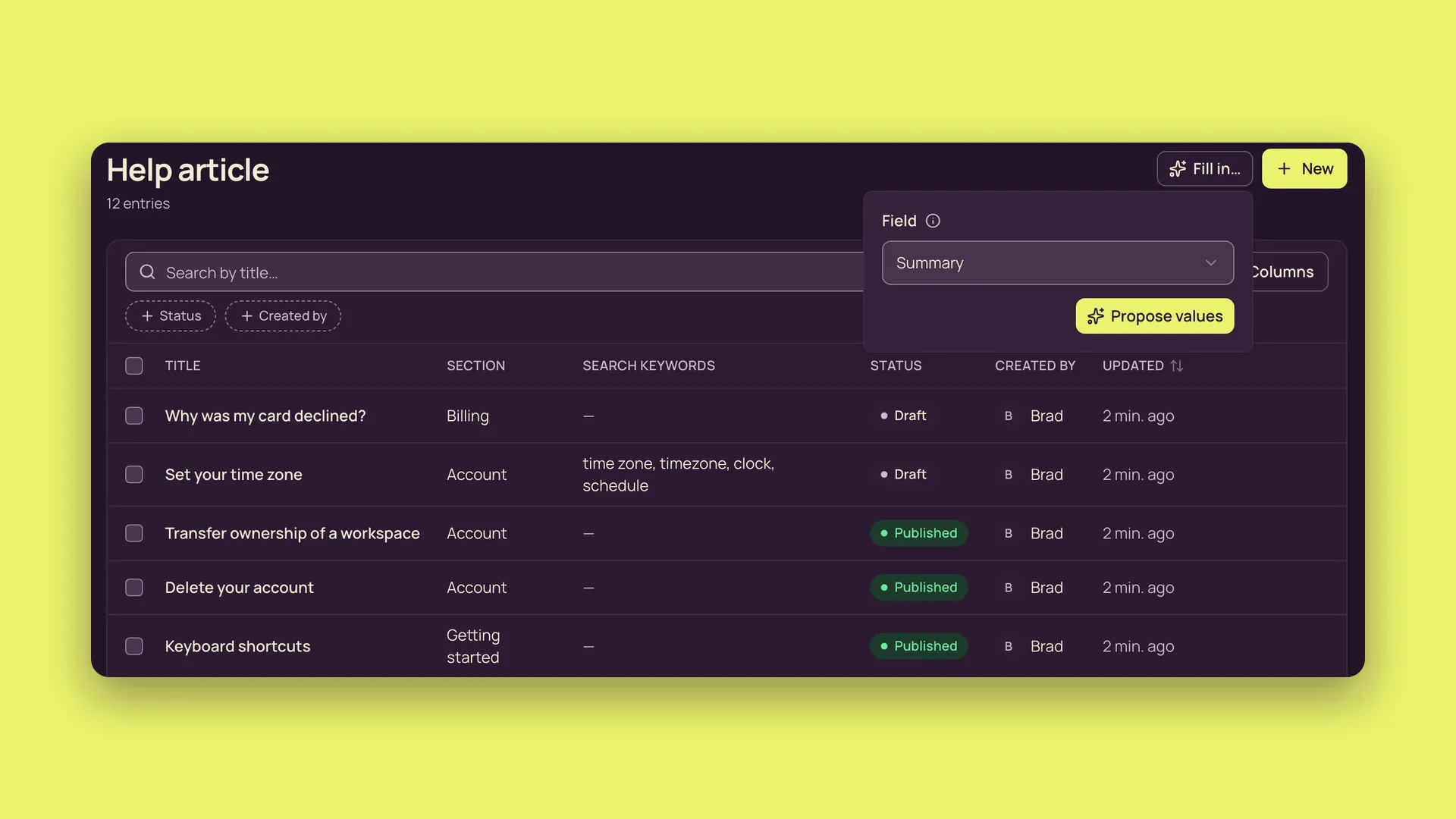
A user runs a help center on Shapio. A few hundred articles, a search keywords field that most of the old ones never got, and an SEO description that is empty on half of them. They would like a model to draft those values. They would not like a CMS vendor's servers to read every unpublished article to do it, and they would not like their editors' work to depend on a vendor's AI subscription.
That second part is the whole design of assist in Shapio, and 0.8.0 makes it worth talking about: assist now writes, suggests, and fills, not just rewrites. Here is what shipped, and why the keys stay in your hands.
Whose model it is
Open Shapio and assist is off. Not hidden behind a plan, off: the endpoints don't exist, every assist control in the admin is absent, and nothing is sent anywhere. A test in the suite checks that on every build.
Turning it on is three environment variables on your own server:
AI_PROVIDER=anthropic   # or openai, or openai-compatible
AI_MODEL=<the model your provider expects>
AI_API_KEY=<your key>
AI_PROVIDER=anthropic with a key from your Anthropic console sends requests straight from your server to Anthropic's Messages API, with the model you name. AI_PROVIDER=openai with a key from your OpenAI account does the same against Chat Completions. Your account, your usage, your bill, and nobody in between. The third option, openai-compatible, points AI_BASE_URL at Ollama, LM Studio, vLLM, or a proxy you run, so the model can sit on hardware you own and nothing leaves your network. In every case the key is read from the environment only. The admin never shows it and has no field to type it into.
Setting them is one of the few things in Shapio that takes a restart. Content models change live in production, and so do roles, webhooks, and change sets, but a model provider is operator configuration, read once at boot, on purpose: no admin can switch where your content is sent by editing a settings page.
The rest of the contract is just as plain:
Only what the action needs is sent. A suggestion sends the entry's title and text values and the target field's label and limits. A write sends the text around the cursor. A rewrite sends the selection and the instruction. The assist documentation lists it per action.
It goes to your provider and nobody else. Private media and fields marked not public are sent only to the provider you configured, and only when the person asking may read them. If your policy doesn't allow that for some content, use a local model, or leave assist off.
Content is data, not instructions. Text written by people goes to the model inside a delimited block the model is told to treat as material to work on. A sentence like "ignore your instructions" inside an article stays a sentence.
Shapio keeps a record, not the text. Every run writes one row: who, which action, provider and model, token counts, duration, outcome. No prompt or answer is stored. The audit log gets the same event with the IDs involved, and accepting a fill is its own audit event with the entry, its fields, and the change set.
People ship. Every result is a proposal for a person to review. Nothing is ever published by assist.
This is a different arrangement from the one that is becoming common. Strapi's AI features, going by Strapi's own plan page as of today, are not in the open-source core at all. On the Growth plan they run as Strapi AI on Strapi's infrastructure, metered in credits. Bringing your own key takes the Enterprise plan plus a paid Strapi AI Enterprise add-on, and even then it covers translations and media metadata, while the content-type assistant stays on Strapi's side. Different products make different trade-offs. For a team whose unpublished content is the thing they are protecting, this one matters.
What 0.8.0 adds
Three things, all of them proposals.
Write… and Continue writing. In a rich-text document, the / menu, the + block menu, and the form editor's toolbar have an Assist group. Write… asks what to write ("a section on pricing"); Continue writing picks up where the text stops. The answer opens beside the document as editable rich text, formatted with the same toolbar. Insert puts it in as real headings, paragraphs, and lists at the place you started, which follows your edits in the meantime. Discard throws it away. Escape or a click outside asks first when the proposal has text.
Suggest. Point at any string or text field, the title and the SEO fields included, and Suggest appears under it. It writes a value from the rest of the entry, shaped by the field's label, help text, and limits: search keywords from the article, an SEO description that aims at 160 characters without being cut, a short title. It fills the field as an ordinary unsaved edit, and you save when it reads right.
Fill in… At the top of a content type's list, pick a field and a model proposes a value for every entry where it is empty, up to 50 per run, in the list's locale. The Inbox's "Required fields left empty" group gets the same thing as Propose fixes. The proposals open in a review sheet, grouped by entry: edit a value, reject a field, and Accept saves the rest into the entry's draft and adds the entry to one change set opened for the run. An entry that already had unpublished edits, or was never published, is saved as a draft but left out of the set, with the reason shown, so shipping the set never publishes more than the fill. Nothing goes live until someone ships it.
For the help center above, that is: make Search keywords required, let the Inbox list the articles without one, run Propose fixes, read through the proposals, and ship the change set. The articles the model got wrong get a corrected value or a rejection, and the whole thing is one reviewed change in the history, attributed to the person who accepted it.
What is not there
No streaming, so each answer arrives in one piece within the timeout you set. No images, tables, or links are ever written by a model. Enums, numbers, dates, slugs, media, and relations get no suggestion in the admin. Assist needs no Shapio account, no hosted service, and no telemetry; nothing leaves your server unless you configured a provider for it to go to.
Assist write and fill is in 0.8.0. The assist documentation has the setup for Anthropic, OpenAI, and a local model, the table of what each action sends, and every endpoint.